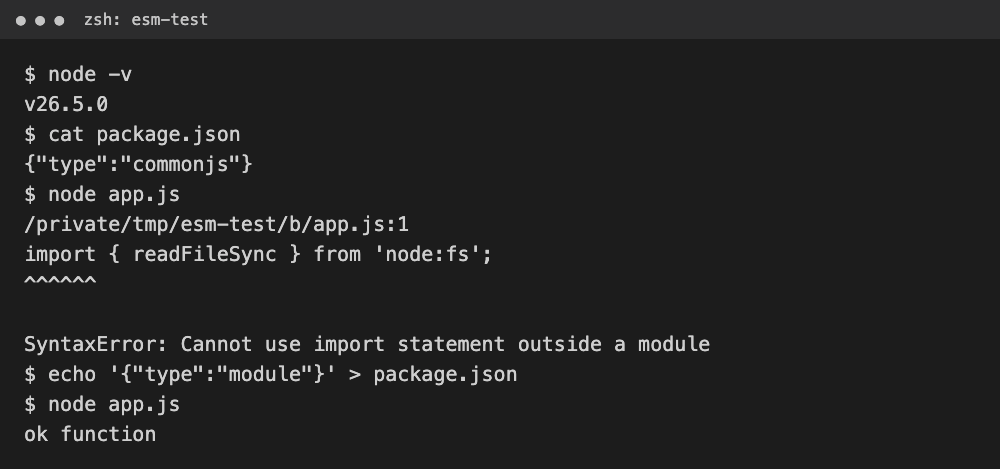
이 오류는 import 문법(ES 모듈)을 쓴 파일을 Node.js나 브라우저가 CommonJS나 일반 스크립트로 읽을 때 납니다. Node.js라면 package.json에 "type": "module"을 넣거나 파일 확장자를 .mjs로 바꾸면 되고, 브라우저라면 script 태그에 type="module"을 붙이면 됩니다.
그런데 요즘 Node.js는 package.json이 없으면 이 오류가 아예 안 나기도 해요. 그래서 "어떤 경우에 나고 어떤 경우에 안 나는지"를 같은 코드로 직접 실험해 봤습니다.
테스트 환경: macOS 26.6.2, Node.js v26.5.0, Chrome 153
실험에 쓴 코드는 두 줄짜리예요
파일 내용은 모든 경우에 똑같이 아래 두 줄입니다. 바뀌는 건 파일 확장자와 package.json뿐이에요.
import { readFileSync } from 'node:fs';
console.log('ok', typeof readFileSync);
네 가지 경우를 돌린 결과
| 경우 | package.json | 결과 |
|---|---|---|
| app.js | 없음 | 정상 실행 |
| app.js | "type": "commonjs" | 오류 |
| app.cjs | 없음 | 오류 |
| app.js | 있지만 type 없음 | 정상 실행, 경고 출력 |
package.json에 "type": "commonjs"를 적어 둔 폴더에서 실행하면 바로 오류가 납니다. 실제 출력은 이랬어요.
$ node app.js
(node:35366) Warning: Failed to load the ES module: /private/tmp/esm-test/b/app.js. Make sure to set "type": "module" in the nearest package.json file or use the .mjs extension.
/private/tmp/esm-test/b/app.js:1
import { readFileSync } from 'node:fs';
^^^^^^

SyntaxError: Cannot use import statement outside a module
확장자를 .cjs로 저장한 경우도 똑같은 SyntaxError가 났습니다. .cjs는 "이 파일은 CommonJS"라고 못 박는 확장자라서 import를 쓸 수 없어요.
package.json이 없는데 왜 오류가 안 날까
Node.js 22.7.0과 20.19.0부터 "모듈 문법 감지"가 기본으로 켜졌기 때문이에요. type이 정해지지 않은 .js 파일은 먼저 CommonJS로 읽어 보고, import 같은 ES 모듈 문법 때문에 실패하면 ES 모듈로 다시 읽습니다.
그래서 package.json은 있는데 type만 비어 있는 폴더에서는 실행은 되면서 아래 경고가 붙었어요.
(node:35386) [MODULE_TYPELESS_PACKAGE_JSON] Warning: Module type of file:///private/tmp/esm-test/d/app.js is not specified and it doesn't parse as CommonJS.
Reparsing as ES module because module syntax was detected. This incurs a performance overhead.
To eliminate this warning, add "type": "module" to /private/tmp/esm-test/d/package.json.
ok function
경고 문구대로 두 번 읽느라 성능 손해가 있으니, 오류가 안 나더라도 type을 적어 두는 편이 낫습니다. 예전 블로그 글에서 "Node는 import를 못 쓴다"고 하는 설명은 이 기능이 켜지기 전 버전 기준이에요.
오류를 없애는 세 가지 방법
첫 번째는 package.json에 type을 module로 적는 방법이에요. 프로젝트 전체를 ES 모듈로 쓸 때 가장 깔끔합니다.
{
  "type": "module"
}
두 번째는 파일 확장자를 .mjs로 바꾸는 방법이에요. package.json을 건드리기 싫거나 파일 하나만 ES 모듈로 쓰고 싶을 때 좋습니다. 위 실험에서 오류가 났던 두 경우 모두 이 두 방법 중 하나로 바꾸자 아래처럼 정상 실행됐어요.
$ node app.js
ok function
$ node app.mjs
ok function
세 번째는 브라우저에서 이 오류가 날 때예요. Chrome 153에서 type 없는 script 태그에 import를 넣으니 같은 문구의 SyntaxError가 났고, type="module"을 붙이니 정상으로 실행됐습니다.
<script type="module" src="./main.js"></script>type을 module로 바꾼 뒤 새로 생기는 오류
"type": "module"로 바꾸고 나면 기존 require 코드가 이번엔 다른 오류를 냅니다. 같은 폴더에서 require를 쓰는 파일을 돌려 봤어요.
ReferenceError: require is not defined in ES module scope, you can use import instead
This file is being treated as an ES module because it has a '.js' file extension and '/private/tmp/esm-test/b/package.json' contains "type": "module". To treat it as a CommonJS script, rename it to use the '.cjs' file extension.
이럴 땐 그 파일만 .cjs로 바꾸거나, require를 import로 고치면 됩니다. 한 파일 안에서 import와 require를 꼭 같이 써야 한다면 createRequire를 쓰면 돼요. 아래 코드는 실제로 실행해서 "/ function"이 출력되는 걸 확인했습니다.
import path from 'node:path';
import { createRequire } from 'node:module';
const require = createRequire(import.meta.url);
const fs = require('node:fs');
console.log(path.sep, typeof fs.readFileSync);
실험해 보고 알게 된 것
이 오류가 나면 먼저 파일과 가장 가까운 package.json을 열어 type 값을 보세요. "commonjs"로 적혀 있거나 파일이 .cjs면 원인은 거기 있습니다.
Node 버전이 22.7.0보다 낮다면(20 버전대는 20.19.0보다 낮다면) package.json이 없어도 이 오류가 납니다. node -v로 버전도 같이 확인하면 원인을 빨리 좁힐 수 있어요.
관련 글: javascript ajax 사용방법 예제
이 글의 코드와 명령어는 직접 실행해 확인했고, 정리에는 AI 도구를 활용했습니다.
출처: Node.js 공식 문서 Modules: Packages(Determining module system, Syntax detection), Command-line API(--no-experimental-detect-module), Node.js 22.7.0 및 20.19.0 릴리스 노트 (2026년 10월 17일 확인)
'Script > Javascript' 카테고리의 다른 글
| javascript 문자열이 유효한지 체크하는 함수 ( validation ) (0) | 2023.04.19 |
|---|---|
| Javascript replace 역참조 치환 예제 (0) | 2023.02.06 |
| javascript 현재날짜 기준 과거 미래 체크 (0) | 2023.02.03 |
| 자바스크립트 timestamp 변환 최종정리 (0) | 2023.02.03 |
| 자바스크립트 초간단 엔터값 처리하기 (0) | 2022.07.26 |

댓글